


Registrations Now Open
legalsuper's New EmployerAccess Portal is now live. Register now to start using the new portal and get ahead of the Payday Super changes coming 1 July.

What is the new Employer Portal?
legalsuper's new Employer Portal is an integrated clearing house and self-service administration platform, provided by Wrkr, designed to help you meet your super obligations.
It replaces the current SCH Online and EmployerAccess platforms and brings together everything you need to manage super contributions in one place — with a modern interface, real-time validation and support for the upcoming Payday Super legislation.

Getting ready for Payday Super
Under the Payday Super legislation, effective 1 July 2026, employee super payments will need to align with each pay run. The new Employer Portal is built to support this change, with real-time data entry checks, automated alerts and clear reporting across single or multiple ABNs.
Transitioning to the new portal ahead of this date means your business will be ready when the legislation takes effect.
Key features
Single login for all super compliance admin
Simple, user-friendly interface
Real-time validation and status tracking
Secure MFA sign-in
Digital employee onboarding, including super stapling
Multi-entity switching for multiple ABNs
Smart alerts and in-platform guidance
Bulk contribution file upload with reusable templates
Built for Payday Super

What happens to the current system?
SCH Online and EmployerAccess will remain available throughout the transition period. Key dates for when these platforms move to read-only mode and eventually close will be communicated to employers in due course.
We recommend downloading any historical contribution reports you may need from SCH Online or EmployerAccess for your records before the transition is complete.

What do I need to do right now?
If you haven't registered yet, now is the time. Click the ‘Register Now’ link above to get started.
If you're already registered and setting up, we recommend downloading your historical contribution reports from SCH Online before the transition is complete. This ensures you have a full record of past contributions for your own records.
To download your reports from SCH Online:
- Log in to SCH Online
- Go to the Reports menu
- Select Yearly Contribution Report
- Filter by date range and download

Resources
To help you prepare for the transition, we've put together the following resources. Download and share them with anyone in your organisation who manages super contributions.
Step-by-step guides are also available in our Help Centre.
The New Employer Portal
The current SCH Online and EmployerAccess platforms will not be updated to meet the requirements of the new Payday Super legislation, which requires contributions to align with each pay run from 1 July 2026. The new Employer Portal ensures legalsuper employers have a compliant, future-ready platform ahead of that deadline.
Yes. The portal includes:
- Real-time validation and clear status tracking to help you quickly resolve errors
- Smart alerts and in-platform guidance to keep you on track
- A SuperStream-compliant clearing house, ready for frequent contribution payments
- Self-service tools to help manage your super obligations
If your business manages multiple entities, you can switch between them using a single login. You can also bulk upload contribution files for multiple employees and reuse templates each pay cycle.
It's a one-stop digital experience where you can create or find members, upload or enter contributions, validate data in real time, submit and track payments, and export reports — all in one place, with clear prompts to guide you at every step.
The new Employer Portal supports the industry-standard SAFF file format, which most payroll and HR systems produce. If your system uses a different format, the portal includes a file mapping tool that translates your file into the required format and saves the settings for next time.
Yes. The new Employer Portal supports multi-entity switching, so you can manage contributions for multiple ABNs under a single login.
Yes. Employers will still be able to make manual contributions on a fortnightly basis. The platform accounts for employers who do not use file uploads and allows manual entry for creating new members, updating details of SMSFs and contributions.
If you're paying quarterly, the current 28-day rule still applies up to 30 June 2026. This means super must be received by the fund within 28 days after the end of the quarter. From 1 July 2026, the new Payday Super rules apply to wages paid on or after that date. For example, if your next pay run is on 4 July 2026, the new rules apply to that pay.
The key point is the pay date. Under Payday Super, super must generally be received by the fund within approximately 7 business days of payday, rather than by the quarterly deadline.
Business owners, bookkeepers and payroll service providers who manage super contributions on behalf of an employer.
Yes. You'll be able to register via the legalsuper website. You must be a participating legalsuper employer to register — this can also be set up as part of the registration process.
The new platform supports several formats for contributions and remittance, including SAFF, mapped files, STP2 and STP1.
You can submit contributions by uploading a file or entering details manually — whichever suits your business. The File Mapper in the portal can also be used to map non-SAFF file formats.
The new platform includes automated validation to flag issues such as invalid SMSFs or incorrect details before submission. If a contribution is made to an SMSF that is no longer compliant, the payment will typically be rejected and you'll need to redirect it to another fund (e.g. your default fund).
When making super contributions to SMSFs, additional SMSF information must now be provided before a contribution file can be successfully submitted. Depending on the file format you currently use, this process may differ from how contributions were previously submitted through the old EmployerAccess / SCH Online portal.
Employers using SAFF file method
If you make contributions using an ATO-aligned SAFF file, SMSF information is automatically included and populated. As a result, you should generally not notice any change when submitting your contribution file.
Employers using a non-SAFF file method
If you make contributions using a CSV file extract (for example, from a payroll system), the extract may not automatically include the SMSF payment details of the destination fund, such as the BSB, account number, and account name.
To avoid delays, especially under tighter Payday Super timeframes, SMSF payment details must be included each time contributions are submitted.
There are several ways these additional details can be added:
-
Preferred approach – transition to a SAFF file format
Most payroll providers can generate a SAFF file that aligns with the ATO SAFF file standard. Using this approach helps ensure SMSF information is automatically included in contribution submissions.An ATO-aligned template/example file is available here
- Alternative approach – update your payroll extract or system configuration
If moving to a SAFF file format is not possible, we recommend updating your payroll extract or system configuration to automatically include the required SMSF payment fields. This will help ensure consistency and reduce operational risk. Implementing this change may require support from your payroll provider; or - Manual update during file upload
SMSF payment details can also be added or edited during the contribution file upload process. However, this approach should only be used as a short-term or exception-based workaround.
Note: Manual updates to SMSF payment fields are not recommended, as they increase the risk of errors, require ongoing maintenance each pay cycle, and may create inconsistencies with payroll source data.
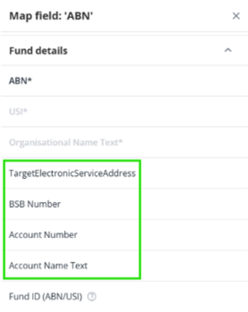
SMSF File mapping fields
If you are using the file mapping feature, the image below shows the SMSF fields that can be mapped. These fields are required when submitting super contributions to an SMSF via file upload.
Note: An Electronic Service Address (ESA) is a unique code used by SMSFs within the Australian SuperStream network to receive contribution and rollover information electronically. It is not an email address.
To confirm the correct ESA for an SMSF, contact the member, refer to the ATO, or check the ATO Register of SMSF Messaging Providers.
legalsuper is committed to supporting employers to be compliant with Payday super via the recently launched new EmployerAccess portal.
Where employers use a payroll provider, the provider is responsible for ensuring its systems, processes and requirements comply with any Payday Super changes. Payroll providers may already have communicated upcoming changes directly to employers. If you have questions about payroll-related updates or functionality, please contact your payroll provider directly.
The Australian Taxation Office (ATO) maintains a list of commercially available software products that support employers in meeting their SuperStream obligations.
Yes. MFA is required for all users and provides enhanced security for your account. You can authenticate via the Google Authenticator app or a one-time code sent to your mobile phone. A personal device can be used if a work device isn't available.
Note: While SMS is available as an MFA option, legalsuper recommends using Google Authenticator where possible for MFA (over SMS) to ensure higher levels of security.
Verification codes are generally delivered to the email address you provided within 5 minutes of the request being made. However, firewall settings, email security protocols, spam filters, or blocked sender settings within some organisations may delay or block these emails, particularly if they originate from a new or unverified sender such as legalsuper or WRKR. These delays can result in the MFA code expiring before it is used.
If this occurs, please check your spam or junk folder and confirm with your IT security department or email provider whether emails from ‘legalsuper’ or ‘WRKR’ have been quarantined, delayed, or blocked.
If invalid or expired MFA codes continue to occur and there does not appear to be a delay caused by internal security settings, please contact us for further assistance. When contacting us, please provide the timestamp of when the email was received.
Transitioning to the New Employer Portal
Registrations are being rolled out in stages. You'll receive a personal invitation by email when your registration window opens. Once you receive your invitation, follow the link to set up your account.
We aim to minimise disruption. There is no planned downtime for clearing house services. We'll communicate any scheduled maintenance in advance.
Yes. Where possible, your existing details from SCH Online will be used to pre-fill your new account, making setup faster and reducing the risk of data entry errors.
Once you activate your new account, SCH Online moves to read-only mode. You won't be able to make changes or new contributions, but you can still access your contribution history. Read-only access will remain available for approximately 12 months. We recommend downloading any reports you need for your records before this period ends.
Log in to SCH Online, go to Contribution within the top navigation menu, select Completed Contributions, then filter and download as needed. We recommend doing this before completing your transition.
You'll have read-only access to SCH Online for approximately 12 months after activating your new Employer Portal account. After this period, SCH Online will no longer be accessible. We recommend downloading any reports needed for record keeping as part of your transition.
No. SCH Online will move to read-only mode during 2026 (date to be confirmed) and will be fully retired after the 12-month access period. You'll need to use the new Employer Portal for all future contributions.
If you choose not to activate your account, you can make alternative clearing house arrangements. Any data prepared for your account will be securely deleted after the transition program ends.
Data Transfer
We'll securely collect your information from SCH Online and core administrator systems. This data will be used to pre-fill your new Employer Portal account, so setup is faster and more accurate.
When activating your account, you'll be asked to review and confirm your details. Most fields can be edited at this stage. You should also review user access, remove any outdated users, and send invitations to the right people. To prepare, we recommend reviewing your SCH Online details now to make sure everything is accurate.
If you choose not to activate your account, any data prepared for your registration will be securely deleted after the transition program ends. SCH Online and EmployerAccess will retain your historical data in accordance with regulatory guidelines.
No. legalsuper will not use employer portal data to approach members of other super funds. This would be contrary to the Privacy Act. Our focus is solely on supporting employers with their contribution and compliance obligations.
Security
Yes. MFA is required for all users and provides enhanced security for your account. You can authenticate via the Google Authenticator app or a one-time code sent to your mobile phone. A personal device can be used if a work device isn't available.
Note: While SMS is available as an MFA option, legalsuper recommends using Google Authenticator where possible for MFA (over SMS) to ensure higher levels of security.
Always log out of EmployerAccess when you've finished your session - don't rely on simply closing your browser or tab.
To keep your account secure:
- Always click Log out when you're done
- Never leave your session open on a shared or public device
- Avoid staying signed in on browsers you don't control
- Avoid using multiple browsers simultaneously for the same session
These simple habits make a significant difference in protecting your organisation's data.
No. You must take a clear photo of the original physical document. Photos of copies will not be accepted.
The platform uses industry-standard security protections including TLS 1.3+ encryption for all data in transit and AES-256 encryption for stored data. Access is strictly controlled to authorised personnel only.
Assistance and Support
This page will be updated with key dates and registration details as the launch approaches. You'll also receive email updates directly to your inbox. Once registered, step-by-step guides will be available within the portal via the Help section.
Our Employer Team is available to assist throughout the transition. Reach out on 1800 060 312, available 8am–8pm AEST/AEDT weekdays.
